Download PDF
Download page Safety instructions / Quick guide Flow-6.
Safety instructions / Quick guide Flow-6
HB-Therm ®
Safety instructions and quick guide
Flow meter / Flow controller Flow-6
EN (Translation of original instructions)
General Information
Read these instructions carefully before starting any work. The basic prerequisites for working safely are compliance with all safety instructions and prudent action by qualified personnel in order to avoid accidents that lead to personal injury / property damage.
Safety instructions are marked by symbols:
Danger! / Warning! / Caution!
 ... indicates a hazardous situation which, if disregarded, may result in injury (Caution!) or serious or fatal injury (Warning!, Danger!).
Danger due to electric shock!
 ... if disregarded, there is a risk of serious or fatal injury.
Hot surface!
 ... if disregarded, there is a danger of mild to severe burns.
Attention!
 ... indicates a potentially hazardous situation which, if disregarded, may result in property damage.
Ensure that this guide is kept readily accessible in the immediate vicinity of the Flow‑6 flow meter/controller. Further instructions are available on the operating unit (Gate‑6 or Thermo‑6), in the e‑cockpit app, or online at https://knowledge.hb-therm.eu. If you have any questions, please contact your local representative (see nameplate) or customer service www.hb-therm.com.
Designated use
The flow meter/controller Flow‑6* monitors parallel‑connected tool circuits. It measures the temperature and flow rate of each individual circuit. In versions with flow control, the flow rate can additionally be regulated per circuit.
The Flow‑6 has no integrated operating or display unit. Operation and display are performed via a temperature control unit Thermo‑6*, a interface server Gate‑6* (with optional equipment ZV), or another system (e.g. an injection molding machine). Communication with the Flow‑6 is via the OPC UA interface.
The Flow‑6 is exclusively designed and constructed for the values specified on the nameplate. Any claims of any kind resulting from use other than the intended use are excluded.
* In this manual, the flow meter/controller Flow‑6, the interface server Gate‑6, and the temperature control unit Thermo‑6 are hereinafter referred to as Flow‑6, Gate‑6, and Thermo‑6.
Allgemeine Sicherheitshinweise
Observe local, legal and company safety regulations and requirements.
Always wear the legally and operationally prescribed protective equipment for the respective work.
Without adequate protection of the supply system, the Flow‑6 may be overloaded and damaged. Install suitable temperature and pressure limiting devices if these are not provided by the supply system.
Operating materials can reach high temperatures and pressures during operation. Contact may cause burns.
At medium temperatures above 55 °C, enclosure surfaces can reach temperatures that may cause burns. Only touch these areas while wearing heat‑resistant protective gloves.
Regularly check the entire system for leaks and damage. Remedy any defects immediately.
Check the hose lines and screw connections for tightness.
Always keep these instructions and all information on the Flow‑6 clearly legible. Replace damaged or illegible information immediately.
Disconnect the Flow‑6 from the power supply before opening it.
Carry out the requested maintenance work. Maintenance work may only be carried out by qualified personnel.
Cool down the Flow‑6 before carrying out maintenance, repair or cleaning work. Depressurise the Flow‑6 and disconnect it from the power supply.
Only use original spare parts from the manufacturer.
Transport and packaging
Check the delivery immediately on receipt for completeness and for any transport damage.
Transporting, crane and lifting equipment must be suitable and operated by qualified personnel.
For transport, the Flow‑6 must be completely drained.
For proper handling and in‑plant transport, observe the symbols and instructions on the packaging
To protect the Flow‑6, do not remove the packaging until shortly before installation.
For shipping a Flow‑6, use the original packaging or equivalent packaging.
Procedure for carrying by crane
No rotational movements are permitted when lifting the Flow‑6. There is a risk that the lifting eye / eye bolt may loosen.
The attachment points (M8 threads) are located on the top and bottom.
- Screw the lifting eye / eye bolt fully into one of the designated M8 threaded holes and tighten securely.
- Securely attach the lifting sling to the lifting eye / eye bolt.

Installation
Electrical installation and initial commissioning must be carried out by qualified electricians.
Hydraulic installation and initial commissioning must be carried out by hydraulics specialists.
Mount the Flow‑6 only on stable mounting surfaces or fixtures. The load-bearing capacity must be at least four times the device load. Use suitable fastening elements.
To protect the entire system, the guide values for water quality must be observed. Detailed information is available at https://knowledge.hb-therm.eu.
Installation conditions
| Location | Water‑protected indoor area with sufficient ventilation |
Max. installation altitude | 3000 m above sea level |
Installation surface | Stable, load‑bearing mounting surface or fixture (at least four times the unit load) |
Installation position Version: |
1 Vertical, main manifold at the top (recommended – best venting) 2 Vertical, main manifold at the bottom 3 Horizontal, individual circuits facing downward |
| Permissible ambient temperature | 5–40 °C |
| Relative humidity | 35–85 °C RH (non‑condensing) |
| External cables | Cables must not touch hydraulic lines or parts whose surface temperatures are above 50 °C. |

Connections
Use only suitable pressure- and temperature-resistant connections, screw connections and hose lines.
The Flow‑6 may only be supplied via a SELV/LPS power supply (max. 4 A @ 24 VDC) with reinforced or double insulation. The power supply must be protected against short circuit and overload.
Use shielded cables of category 5 or higher for all Ethernet connections.
Use assembly pastes for all screw connections, as these tend to seize up (especially stainless steel on stainless steel).
IN, OUT
| Main manifold (water supply) | |
| Thread | G1¼ (optional G1) | |
| Resistance | pmax (see type plate), ϑ = 20 + ϑmax (see type plate) | |
IN, OUT (1–n)
| Individual circuits 1–n (tool channels) | |
| Thread | G½ | |
| Resistance | pmax (see type plate), ϑ = 20 + ϑmax (see type plate) | |
Ethernet | – OPC UA interface connection* (M12 D‑coded, 4‑pin, female) – for connection to Gate‑6, Thermo‑6 or machine – for connection of an additional Flow‑6 | |
USB / Reset | – USB-A connection – for service purposes (software update, import/export) – Reset network settings | |
| 24 VDC | – 24 VDC connection (M12 A‑coded, 4‑pin, male; Pin 1 = 0 VDC; Pin 2 = 24 VDC; Pin 4 = Earth (PE)) – Power supply via power supply unit or machine control | |
| – Functional earth for EMC purposes | |


* The Flow‑6 is equipped with M12 sockets/connectors in a push‑pull hybrid design. The connections are compatible with M12 push‑pull connectors as well as with conventional M12 screw connectors.
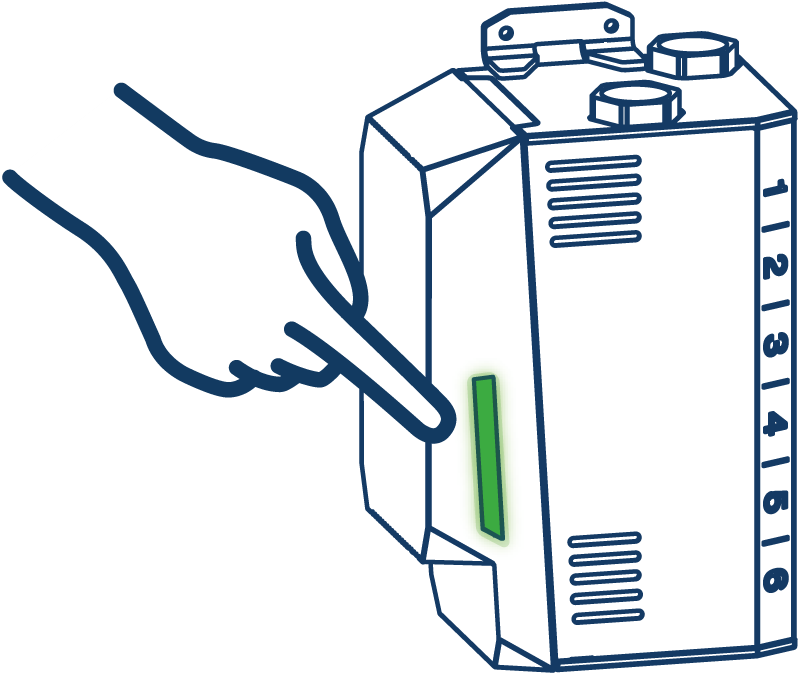
Display / LED meaning
White → Start-up procedure |
|
Green → Operation OK | |
Green flashing → Localization | The LED flashes to indicate the location of the Flow‑6. Procedure: – Select the Flow‑6 in the ꞌFlow overviewꞌ of Gate‑6 or Thermo‑6 – or by calling the ꞌIdentifyDeviceꞌ method via OPC UA (EUROMAP 82.1) |
Yellow-red flashing → Software-Update | Observe the update details on the operating unit of the Gate‑6 or Thermo‑6. |
Yellow flashing → Warning | Observe the warning details on the operating unit of the Gate‑6, Thermo‑6 or the machine. |
Red flashing → Fault | Observe the fault details on the operating unit of the Gate‑6, Thermo‑6 or the machine. |
Green-blue flashing → Data export | Writing data to a connected USB storage device. |
Commissioning
During initial commissioning of the Flow‑6, all electrical connections must be checked.
The Flow‑6 is switched on and off by connecting or disconnecting the power supply. All control cables can be connected and disconnected during operation (hot-plugable).
The Flow‑6 has no integrated operating controls. Operation and display are carried out via the Gate‑6 (optional equipment ZV) or the Thermo‑6, or in a limited form via the machine.
For operation of the Flow‑6 with Gate‑6 or Thermo‑6, software version SW61‑1_2625 or newer must be installed on the Gate‑6 or Thermo‑6.
Procedure
- Provide Gate-6 oder Thermo-6.
- Install the Flow‑6 at the desired installation location.
- Connect the individual tool circuits of the consumer to circuits 1–n.
- Connect the water supply to the main manifold IN and OUT.
- Connect the control cables as shown in the following figure. Further connection variants are available at htttps://knowledge.hb-therm.eu.

- Connect the power supply cable to the Flow‑6.
- Connect the power supply unit to an electrical outlet if the power supply is not provided directly by the machine.
→ As soon as the Flow‑6 is connected to the power supply, the LED lights up white.
→ The 'Flow' overview window opens automatically on the Gate‑6 or Thermo‑6 as soon as a new Flow‑6 is connected and detected. - Set up the newly detected Flow‑6 according to the instructions on the Gate‑6 or Thermo‑6.
* Standard communication interface for special type E1

| Overvoltage category | I |
| Degree of contamination | 2 |
| Power supply | 24 VDC +/-10% |
The type plate is located on the underside of the Flow‑6 (for vertical installation with the main manifold at the top).
The following information can be taken from the type plate:
· Type
· Unit number
· Performance values
· Optional equipment
· Connection values
· Year of manufacture
· Protection class
· Manufacturer
· Service point
O8411-EN 2026-05