Download PDF
Download page Maintenance pump.
Maintenance pump
The integrated pump maintenance interval (component M 1 in the hydraulic scheme) takes into account the pump status monitoring (hydraulic status) on the one hand and the pump operating hours on the other hand to display the percentage maintenance pump. The integrated pump maintenance interval is used for preventive maintenance. Early detection of wear and tear minimizes unwanted unit downtime. This increases the reliability and efficiency of the unit and helps the operator plan maintenance work.
Pump status monitor
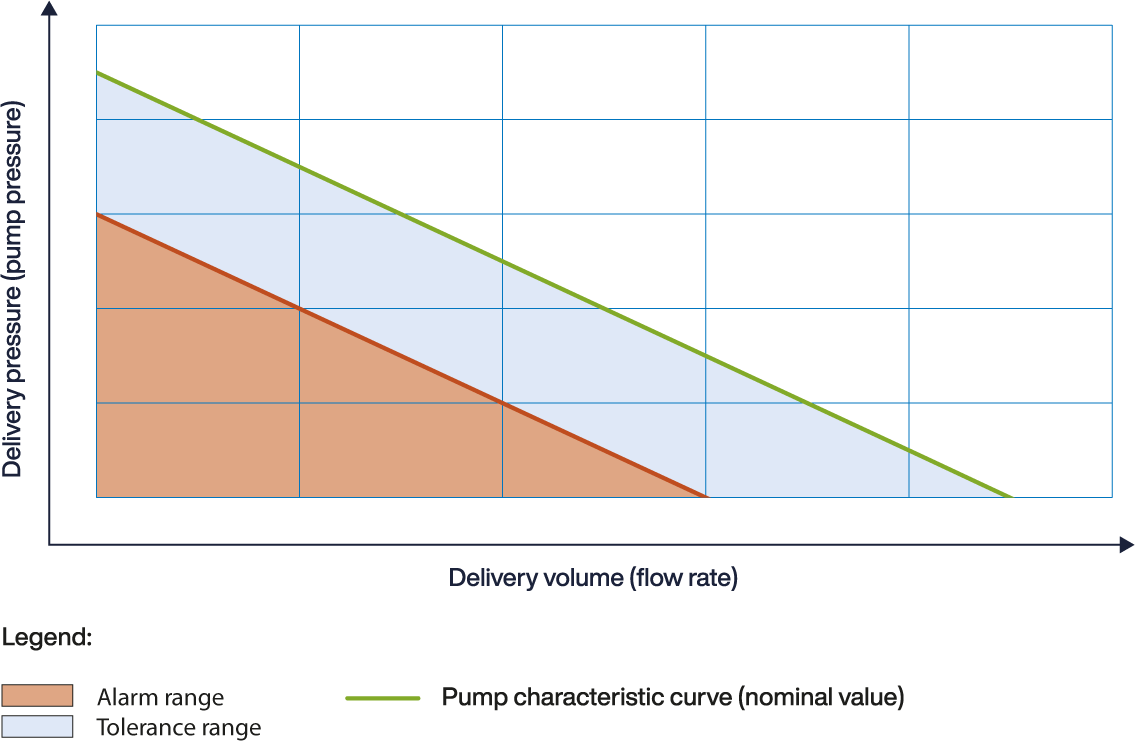
Pumps in temperature control circuits are subject to operational wear and tear. During operation, Pump status monitor detects a reduction in flow due to wear and tear at an early stage. The pump condition is calculated as a percentage based on measured values and configured characteristic curve data. If the value falls below the set limit, which is set to 60% by default, the unit displays a maintenance message and signals this with the warning symbol on the basic screen. 
Monitoring is based on the following metrics:
- main line pressure (measured at the pump outlet)
- System pressure (measured at the pump inlet)
- flow rate (measured in the unit)
Show pump condition
The parameter shows the calculated hydraulic pump condition. A value of 100% means mint condition. A lower value indicates wear on the pump hydraulics (impeller, housing).

NOTE!
The condition of the pump is only shown approximately 30 minutes after the unit is switch on.
-
On the home basic screen, tap the menu button

- Select [Display] > [Actual Values] > [Pump Condition]
- Read the parameter value
Set limit value
The parameter defines the percentage of the hydraulic pump status at which a maintenance message is output. A larger value results in an earlier edition of the maintenance message.
-
On the basic screen, tap on the profile button

- Select [User Profile] and set it to "Maintenance".
-
On the home basic screen, tap the menu button
- Select [Service] > [Parameter] > [Maintenance] > [Pump] > [Pump condition min.]
- Set the parameter to the desired value
NOTE!
The default value limit value is set to 60%.
Pump maintenance interval
The parameter defines after how many hours of operation of the pump the maintenance progress will reach 100% on the basic screen under the register symbol  . A lower value means that pending maintenance can be achieved more quickly.
NOTE!
If the hydraulic pump condition worsens, the integrated maintenance system takes this into account and issues the pending maintenance message earlier than the set parameter value.
-
On the basic screen, tap on the profile button
- Select [User Profile] and set it to "Maintenance".
-
On the home basic screen, tap the menu button
- Select [Service] > [Parameter] > [Maintenance] > [Pump] > [Factor Pump Time]
- Set the parameter to the desired value