PDF
Download PDF
Download page T29214: Additional equipment_ZE.
T29214: Additional equipment_ZE
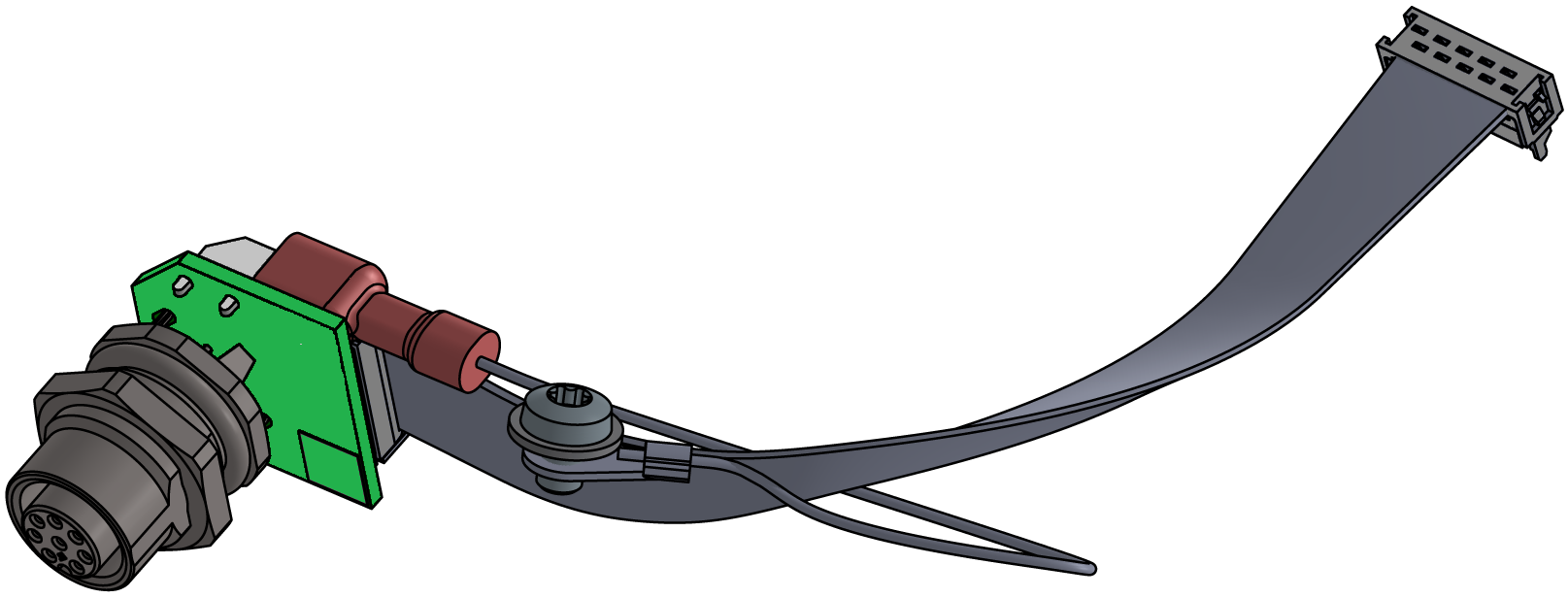
purpose
Retrofitting of additional ZE equipment
qualification
Qualified personnel
Material
| Pos. | Designation | article | T29214 |
| 01 | Platine ZE-61 | T28578 | 1 |
| 02 | flat cable 10-pol. | T28845 | 1 |
| 03 | Draht GNYE | L0708 | 1 |
| 04 | clamping disc | T14219-4 | 1 |
| 05 | screw M4x6 | B3061615 | 1 |
| 06 | Stecker M12, 8-pol. | T26321 | 1 |
| 07 | nameplate | T19277 | 3 |
Required material
- Torx screwdriver size 20
- Ring spanner, size 18
procedure

ATTENTION!
Working with the unit requires knowledge of the safety instructions and quick guide. That's why:
Read the safety instructions and quick guide carefully before starting any work. The basic requirement for safe work is compliance with all safety instructions and careful action by qualified qualified personnel to prevent accidents involving personal injury and property damage.
cooling / switch off
- On the basic screen, tap the function button (
 ).
).- The unit cools down until the temperature is lower than the cooling temperature. The unit then switches off.
- Switch off the main switch (QS 1), pull out the mains-connector.
Open front
- Open the front door and fold the front completely down by loosening the two Torx screws.
Retrofit
- Remove the blind plug from the appropriate connection to the additional equipment. This is no longer required.
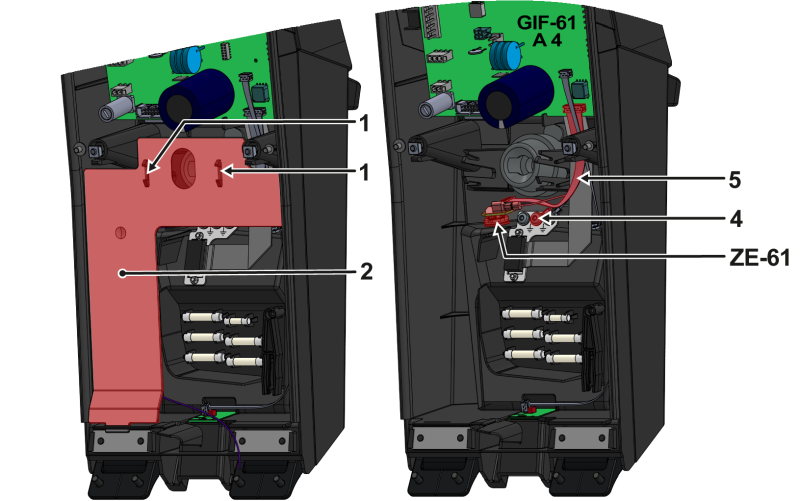
- Press the mounting straps (①) together and remove the cable cover (②).
- Pass the board (ZE-61, T28578) from the inside of the front through the “ZE” opening and secure it from the outside with the hexagonal nut.
- Remove the hexagonal nut from the ZE-61 board connector first.
- Connect the ground connection (L0708) with a flat plug to the board (ZE-61).
- Secure the ground connection (L0708) to the grounding plate (④) using a clamping disc and screw.
- Make sure that plug connections are correctly attached (see electrical circuit diagram).
- Connect the flat cable (⑤) to the ZE-61 and GIF-61 board (A_4, slot X23).
- Insert the cable cover (②) into the appropriate recesses.
- Make sure the mounting clips (①) snap into place.
Close front
- Fold up the front and secure 2x Torx screws.
- Place new type plates on the rear wall and on the inside of the front door of the unit.
- Close the front door.
Check function
- Connect the mains-connector and switch on the main switch (QS 1).
- The initialisation starts and recognizes the additional equipment.
- The initialisation starts and recognizes the additional equipment.
- Verify that the additional equipment has been recognized. Tapping on the status field (
 ) opens the information system. The information system displays device information and available additional equipment.
- If the additional equipment is not shown, check all connectors and restart the unit.
- Check functionality by connection an external sensor (seeExternal sensor).
- Switch off the main switch (QS 1).